Introduction to Computers: Definition, Components, and Classification
Introduction
In the modern world, computers have become an indispensable part of daily life. From processing complex scientific calculations and managing financial systems to enabling global communication, computers play a vital role across all sectors.
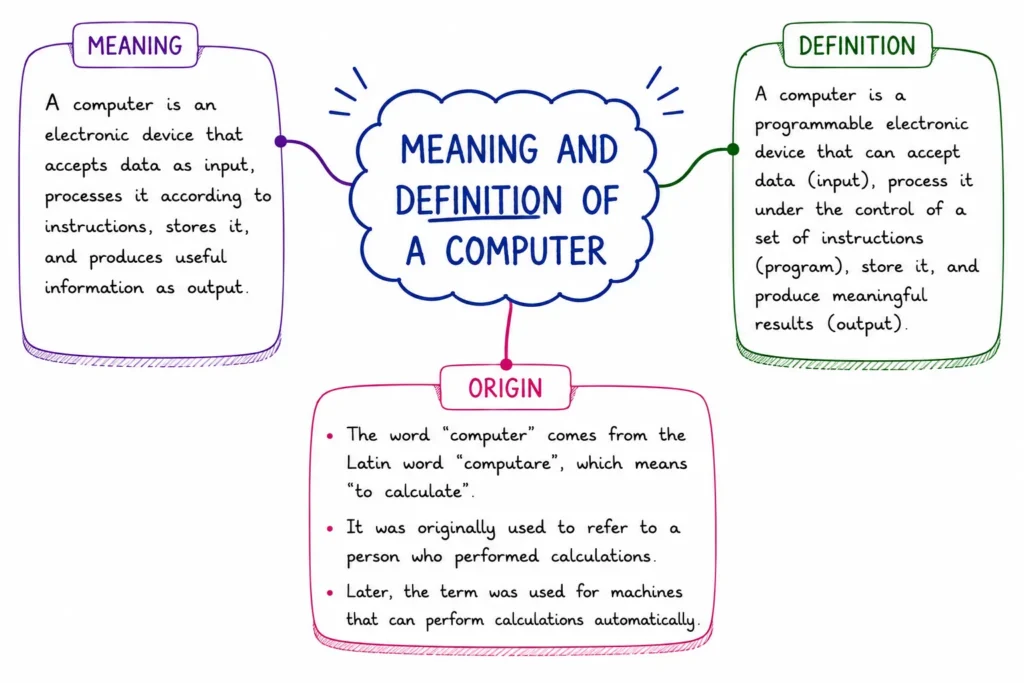
At its core, a Computer is an electronic device that receives raw data as input, processes it according to a set of instructions (a program), and yields meaningful information as output.
Meaning and Definition of a Computer
The word Computer originates from the Latin term computare, which means “to calculate” or “to reckon.” While early computers were designed primarily to perform arithmetic calculations, modern computers process text, images, audio, video, and logical tasks.
Key Concepts:
- Data: Unorganized raw facts, numbers, symbols, or observations (e.g., 85, 90, 78).
- Information: Data that has been processed, organized, and structured to convey meaning (e.g., “The average test score is 84.3”).
- GIGO Principle (Garbage In, Garbage Out): A fundamental rule in computing stating that the quality of output depends entirely on the accuracy of input data. If incorrect data is provided, the output will also be incorrect.
Core Characteristics of a Computer
Computers perform tasks with distinct capabilities that make them vastly superior to manual methods:
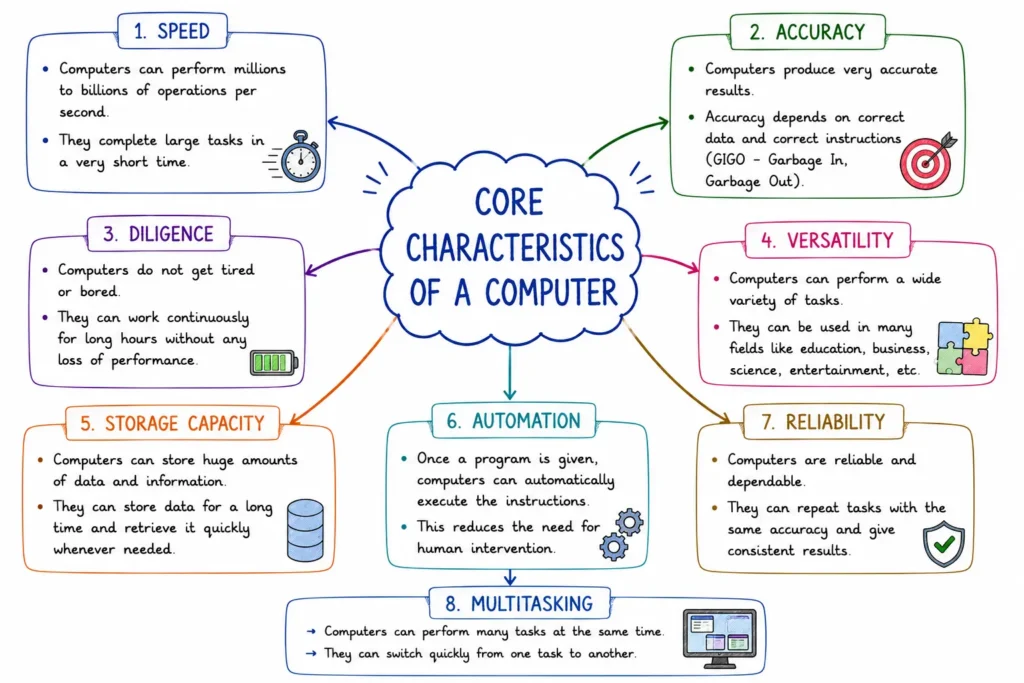
- Speed: Computers process millions of instructions per second (measured in MIPS or gigahertz GHz).
- Accuracy: Computations are performed with high precision and zero operational errors unless faulty data or programming is supplied.
- Diligence: Unlike humans, computers do not suffer from physical tiredness, boredom, or lack of concentration. They can execute millions of identical tasks continuously with the same accuracy.
- Versatility: A single machine can perform diverse tasks ranging from playing music and typing documents to modeling weather patterns.
- Storage Capacity: Computers store massive volumes of data in small physical devices using secondary storage media (hard drives, SSDs).
- No IQ / Subjectivity: A computer has no inherent intelligence or feelings; it follows instructions precisely as programmed by human software developers.
The study of cell biology developed alongside improvements in optical lenses and microscopy during the 17th and 19th centuries.
Basic Functional Architecture of a Computer
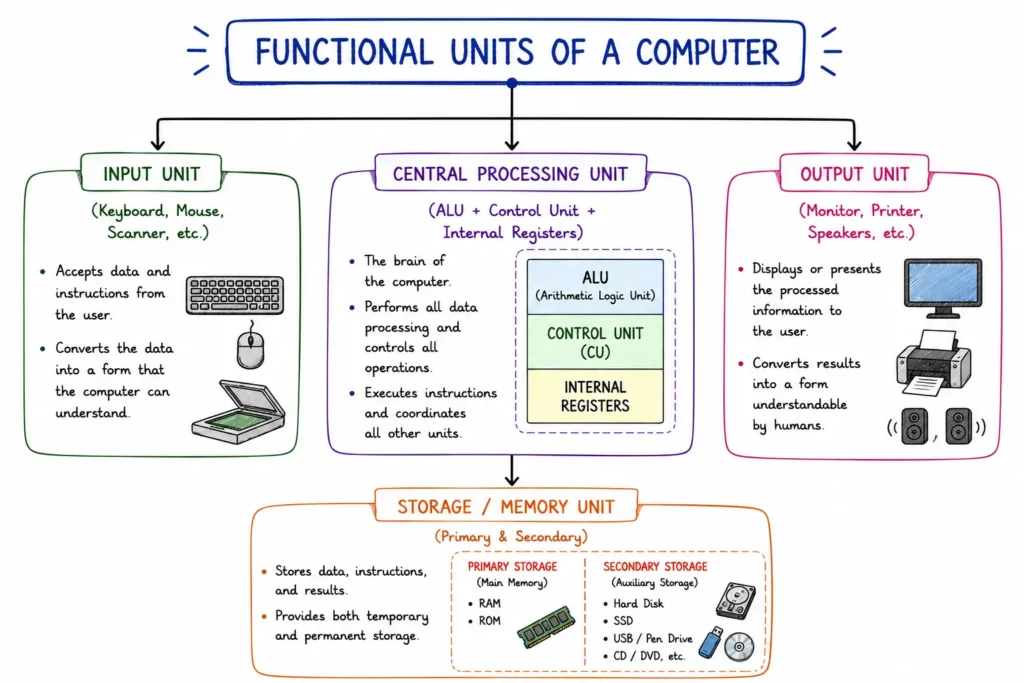
Every digital computer system consists of four primary functional units based on the Von Neumann Architecture:
1. Input Unit
Converts human-readable data into machine-readable binary form (0s and 1s) and passes it to the system.
- Examples: Keyboard, Mouse, Scanner, Microphone, Barcode Reader.
2. Central Processing Unit (CPU)
Often referred to as the “Brain of the Computer,” the CPU executes program instructions and controls operations across all units. It consists of three primary components:
- Arithmetic Logic Unit (ALU): Performs arithmetic operations (addition, subtraction, multiplication) and logical comparisons (>, <, =).
- Control Unit (CU): Acts as the central supervisor, directing data movement between components and coordinating execution sequences.
- Registers: Small, high-speed temporary memory locations inside the CPU used to hold active data and instructions.
3. Memory / Storage Unit
Holds data, program instructions, and intermediate calculation results.
- Primary Memory (Main Memory): Directly accessible by the CPU.
- RAM (Random Access Memory): Volatile memory used to store active programs and working data. Data is lost when power turns off.
- ROM (Read Only Memory): Non-volatile memory containing permanent startup instructions (BIOS).
- Secondary Memory: Non-volatile long-term storage used for permanent data retention.
- Examples: Hard Disk Drives (HDD), Solid State Drives (SSD), Optical Disks, USB drives.
4. Output Unit
Converts processed binary results back into human-understandable form.
- Examples: Monitor, Printer, Speakers, Projector.
Hardware vs. Software
A functioning computer requires a combination of physical machinery and logical instructions:
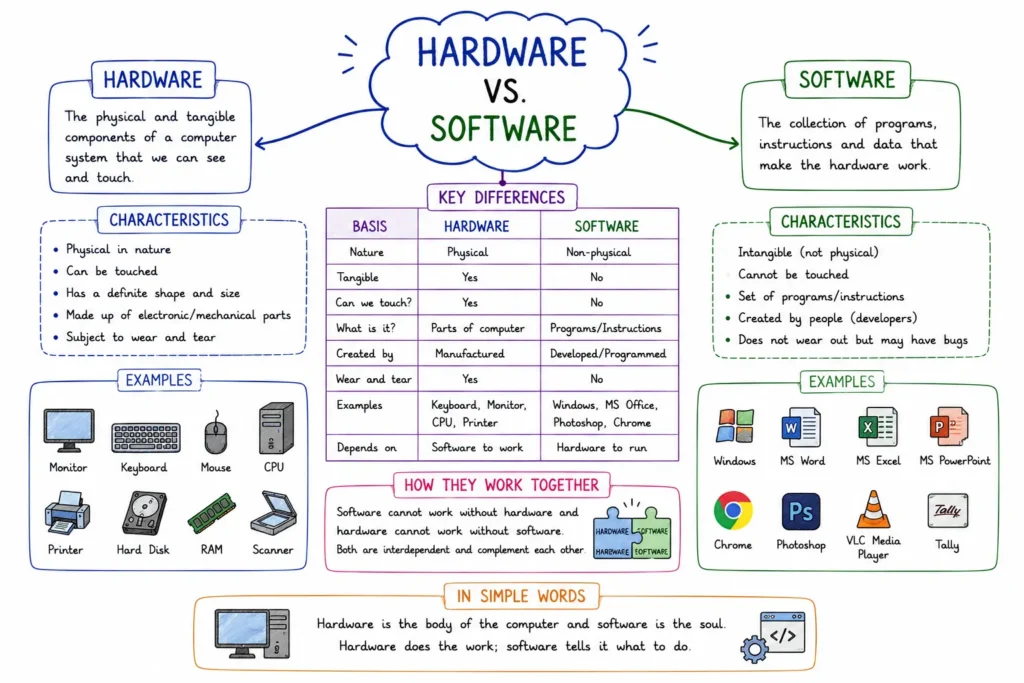
| Feature | Computer Hardware | Computer Software |
|---|---|---|
| Definition | Physical components of a computer that you can touch and see. | Sets of programs and instructions that tell the hardware what to do. |
| Tangibility | Tangible (Physical objects). | Intangible (Digital code). |
| Categories | Input, Output, CPU, Storage, Peripherals. | System Software (OS) & Application Software. |
| Examples | Keyboard, CPU, RAM, Hard Disk, Monitor. | Windows, Linux, MS Office, Web Browsers. |
| Dependency | Cannot work without software instructions. | Cannot execute without physical hardware. |
Classification of Computers
Computers are categorized according to their operating principles and structural capacity:
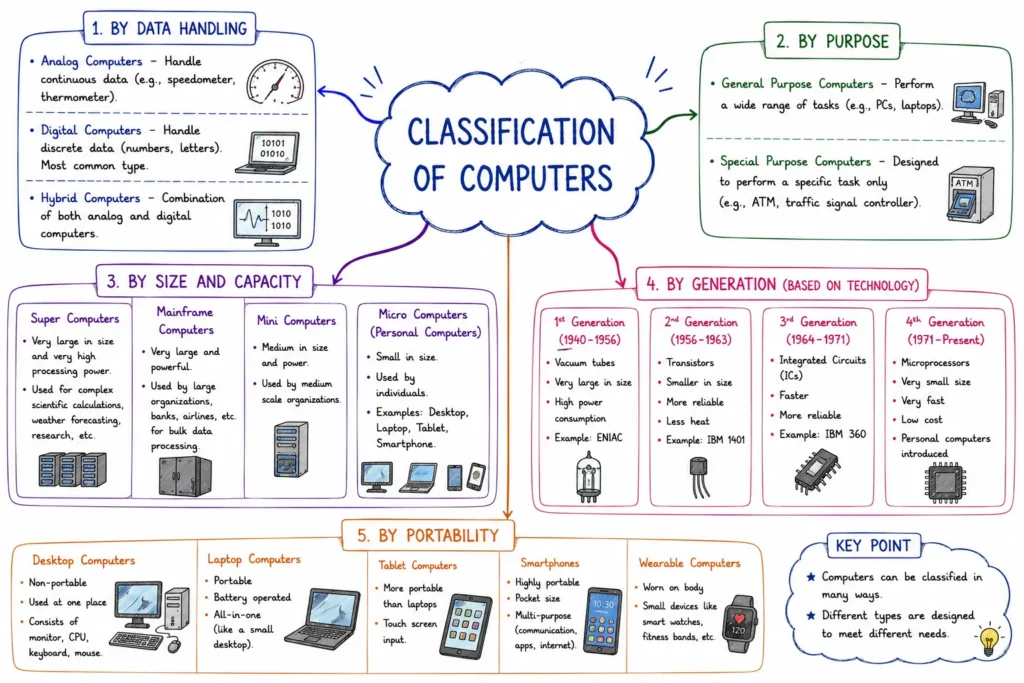
1. Based on Operational Principles
- Analog Computers: Measure continuous physical quantities such as pressure, temperature, or voltage (e.g., traditional speedometers, mercury thermometers).
- Digital Computers: Process data represented as discrete binary digits (0s and 1s). Most modern personal computers belong to this category.
- Hybrid Computers: Combine features of both analog and digital systems (e.g., intensive care unit monitors in hospitals measuring continuous heartbeats while displaying digital readings).
2. Based on Size and Processing Power
- Microcomputers (Personal Computers): Compact, single-user systems powered by a single microprocessor (e.g., laptops, desktop PCs, smartphones).
- Minicomputers: Mid-sized multi-user systems capable of supporting tens to hundreds of users simultaneously, used by medium-sized businesses.
- Mainframe Computers: Large, powerful multi-user systems designed for processing massive transaction volumes continuously (e.g., banking systems, airline reservations).
- Supercomputers: The fastest, most expensive, and most powerful computers, designed for ultra-complex scientific calculations (e.g., weather forecasting, nuclear modeling, space research).
Quick Examination Facts
| Concept / Fact | Key Exam Fact |
|---|---|
| Etymology of ‘Computer’ | Derived from Latin computare, meaning “to calculate.” |
| Father of Computers | Charles Babbage (Designed the Difference Engine and Analytical Engine). |
| GIGO Principle | Stands for “Garbage In, Garbage Out” (Quality of output depends on input). |
| Brain of the Computer | Central Processing Unit (CPU). |
| CPU Components | Arithmetic Logic Unit (ALU), Control Unit (CU), and Registers. |
| Volatile Memory | RAM (Random Access Memory) – loses data when power goes off. |
| Non-Volatile Memory | ROM (Read-Only Memory) & Secondary Storage (HDD, SSD). |
| Fastest Computer Type | Supercomputer (Used for weather forecasting, space science). |
| Binary Digits | Base-2 system using 0 and 1. |
| BIOS | Basic Input/Output System stored permanently in ROM. |
Conclusion
Understanding the basic principles of computing provides the foundation for studying computer science. A computer is an electronic system built on input, processing, storage, and output stages. By organizing physical hardware with logical software, digital computers process raw data into actionable information. Recognizing these core capabilities, functional units, and classification types helps us understand how computer technology continues to transform society.
Introduction to Computers
Practice Quiz
| Some Important Links | |
| Download “Introduction to Computers” PDF | Click Here |